Demo UI
MedCAT Service includes a browser-based demo UI built with Gradio. It lets you try the loaded model on sample or custom text without writing API clients.
Enable the demo UI
Tip
The demo UI is disabled by default. Set these environment variables before starting the service:
| Variable | Description | Default |
|---|---|---|
APP_ENABLE_DEMO_UI |
Mount the Gradio UI on the FastAPI app | False |
APP_DEMO_UI_PATH |
URL path for the UI (empty string mounts at /) |
/ |
See Configuration for more details
The interface adapts to the model you load:
| Mode | When | What you see |
|---|---|---|
| MedCAT | Default (DEID_MODE=False) |
Named entity recognition with highlighted concepts and entity details |
| AnonCAT | De-identification (DEID_MODE=True) |
PHI detection, optional redaction, and a de-identified text output |
MedCAT (named entity recognition)
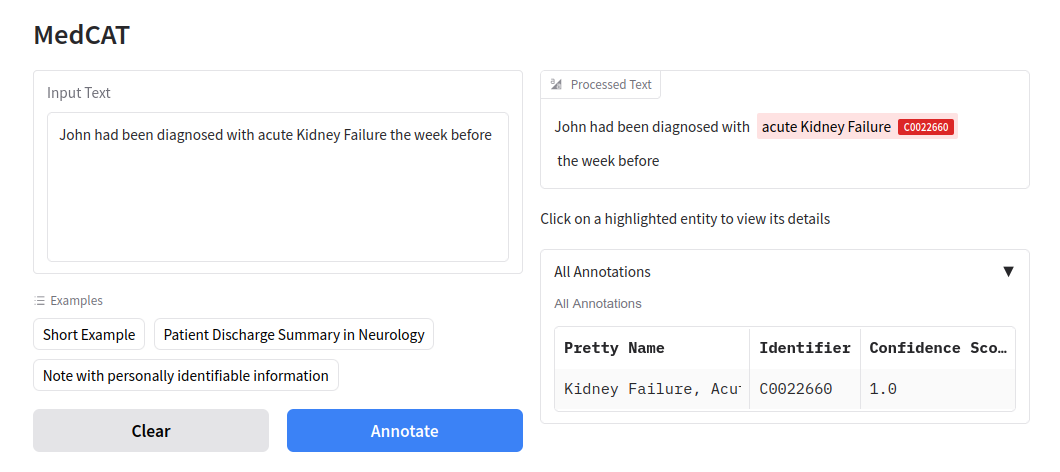
When the service runs with a standard MedCAT model pack, the demo UI shows the MedCAT interface.
Using the UI
- Enter clinical text in Input Text, or pick an example from the dropdown (short note, discharge summary, or a note containing PII for comparison).
- Click Annotate to run the loaded model.
- Review results in the right-hand panel:
- Processed Text — input with recognized spans highlighted in color.
- Annotation Details — click a highlighted span to see the concept name, CUI, confidence, and character offsets.
- All Annotations — expandable table of every entity returned by the model.
Click Clear to reset the input and results.
Recognized concepts depend entirely on the model pack you configured via APP_MEDCAT_MODEL_PACK or the individual CDB/vocabulary paths. Meta-annotation values from the model (for example negation or subject) are reflected in the underlying API responses; the demo table focuses on core entity fields.
AnonCAT (de-identification)
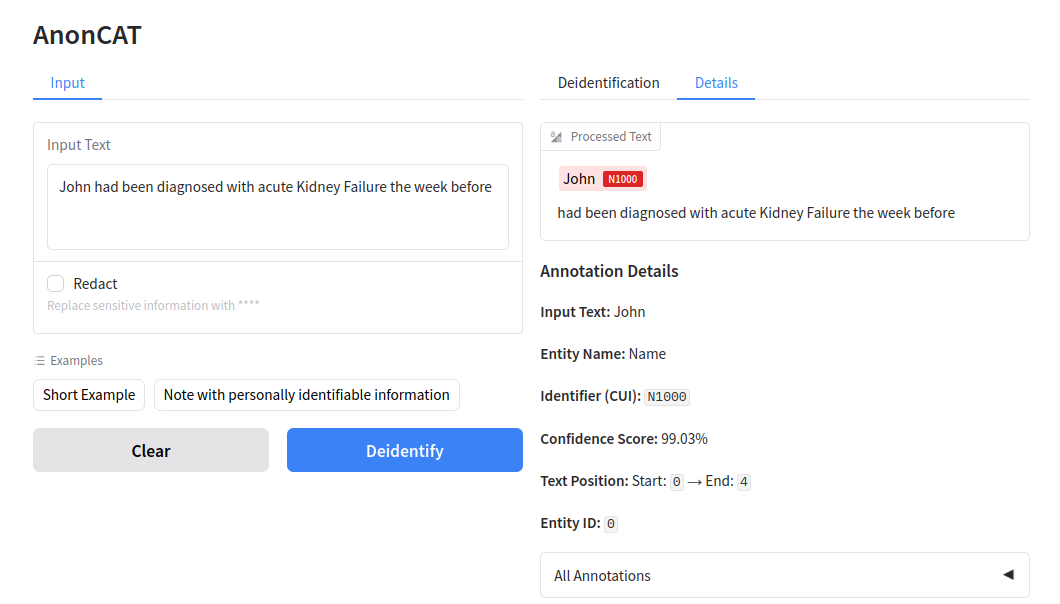
When DEID_MODE=True (or MEDCAT_DEID_MODE=True) and an AnonCAT / de-ID model pack is loaded, the demo UI switches to the AnonCAT interface.
Using the UI
- Enter text in Input Text, or use an example (short note or a note with personally identifiable information).
- Optionally enable Redact to replace detected PHI with
[***]in the de-identified output. When unchecked, identifiable spans are still highlighted in Details, but the de-identified text keeps the original surface forms. - Click Deidentify to process the note.
- Review results across tabs:
- Deidentification — the processed note with redaction applied when Redact is enabled.
- Details — same highlighted view and per-entity details as the MedCAT UI.
Default service redaction for API calls is controlled separately by DEID_REDACT (default True). The Redact checkbox only affects output from the demo UI for that run.
For programmatic access, see API example use.