Natural Language Processing
Overview
CogStack ecosystem provides a standard set of natural language processing applications that are used either as standalone applications or implemented as RESTful services with uniform API, each running in a Docker container. These NLP applications when used inside the data processing pipeline cover one of the key steps of information extraction. These NLP applications may include extracting medical concepts from free-text notes using a specific terminology, such as SNOMED CT or using all the terminologies as available in UMLS. Often, more specialised applications will be built on top of the standard set of NLP applications provided in CogStack, utilising both structured and unstructured information tailored to a defined use-case. These custom applications can be further integrated into CogStack and used as a part of standard set of NLP applications.
Tip
Please see CogStack using Apache NiFi Deployment Examples to see how to integrate NLP services in example data pipelines.
Tip
Apart from being integrated directly in the data processing pipeline, many NLP applications are often used as standalone applications and have a rich set of tools build around them – please see below for more details.
MedCAT - Medical Concept Annotation Tool
Overview
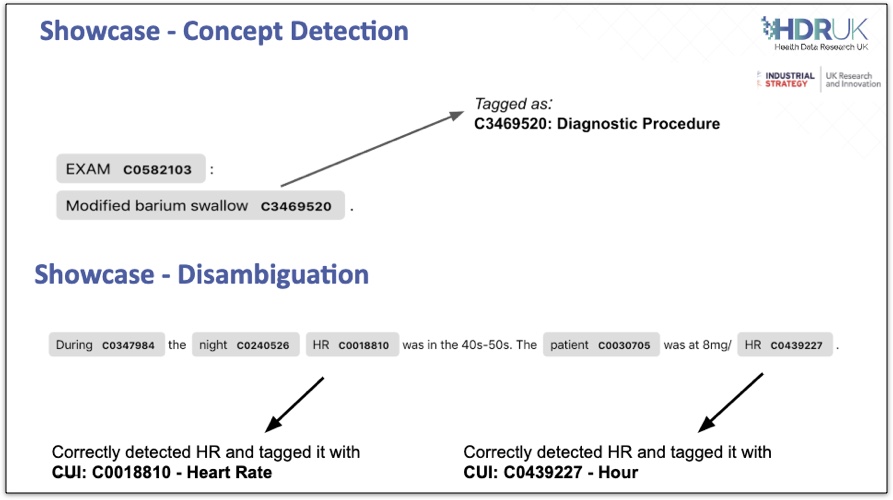
One of the key tools is MedCAT – a Medical Concept Annotation Tool that is used for Named Entity Recognition and Linking (NER+L) tasks for clinical concepts from free-text documents.
| MedCAT is based on a light-weight neural network that calculates vector embeddings and that is used for disambiguation and concept detection. MedCAT also uses Deep Learning Language Model that is used for detection of negation, experiencer or any other type of classification. MedCAT can utilise a concepts dictionary with a vocabulary provided by the end-user that will be used to perform annotate the concepts in the clinical notes. The provided concepts dictionary can be e.g., SNOMED CT terminology or full/ subset of UMLS resource. Apart from providing the vocabulary and concepts dictionary, the underlying MedCAT model can be further trained and fine-tuned for performing context-aware concept disambiguation with additional meta-annotations tasks. MedCAT be run also directly with pre-trained models. MedCAT can be used either as a standalone Python module, as a part of a model trainer application MedCAT Trainer or be deployed as a RESTful MedCAT Service inside a data processing pipeline. Below are briefly covered possible ways of working with MedCAT. |
 |
Warning
Please note that we only provide few basic models for MedCAT that have been prepared using open datasets. Some of the used models are restricted by the external licensing of the resource that was used to build it, such as SNOMED CT or UMLS. In such cases, the user needs to apply for an appropriate license – please see: UMLS licensing and SNOMED CT licensing.
Important
When deploying MedCAT into data processing pipelines one may be interested in training and tailoring the MedCAT models as a part of model preparation. This can be done directly by using MedCAT Trainer or MedCAT library working with a corpus of input documents. Such trained model can be in the next step provided into MedCAT Service that will be deployed as a service and used in the data pipeline.
MedCAT Python module
Key resources:
- GitHub repository with code and documentation: https://github.com/CogStack/MedCAT
- MedCAT publication: https://arxiv.org/abs/1912.10166
- Tutorial on MedCAT: MedCAT – Analysing Electronic Health Records (in a series of articles)
- PIP repository: https://pypi.org/project/medcat/
Tip
The MedCAT Python library is the functional core of MedCAT project. The library is used by MedCAT Trainer when training and updating the models. It is also used within the MedCAT Service that exposes the medical concepts extraction functionality.
MedCAT Trainer
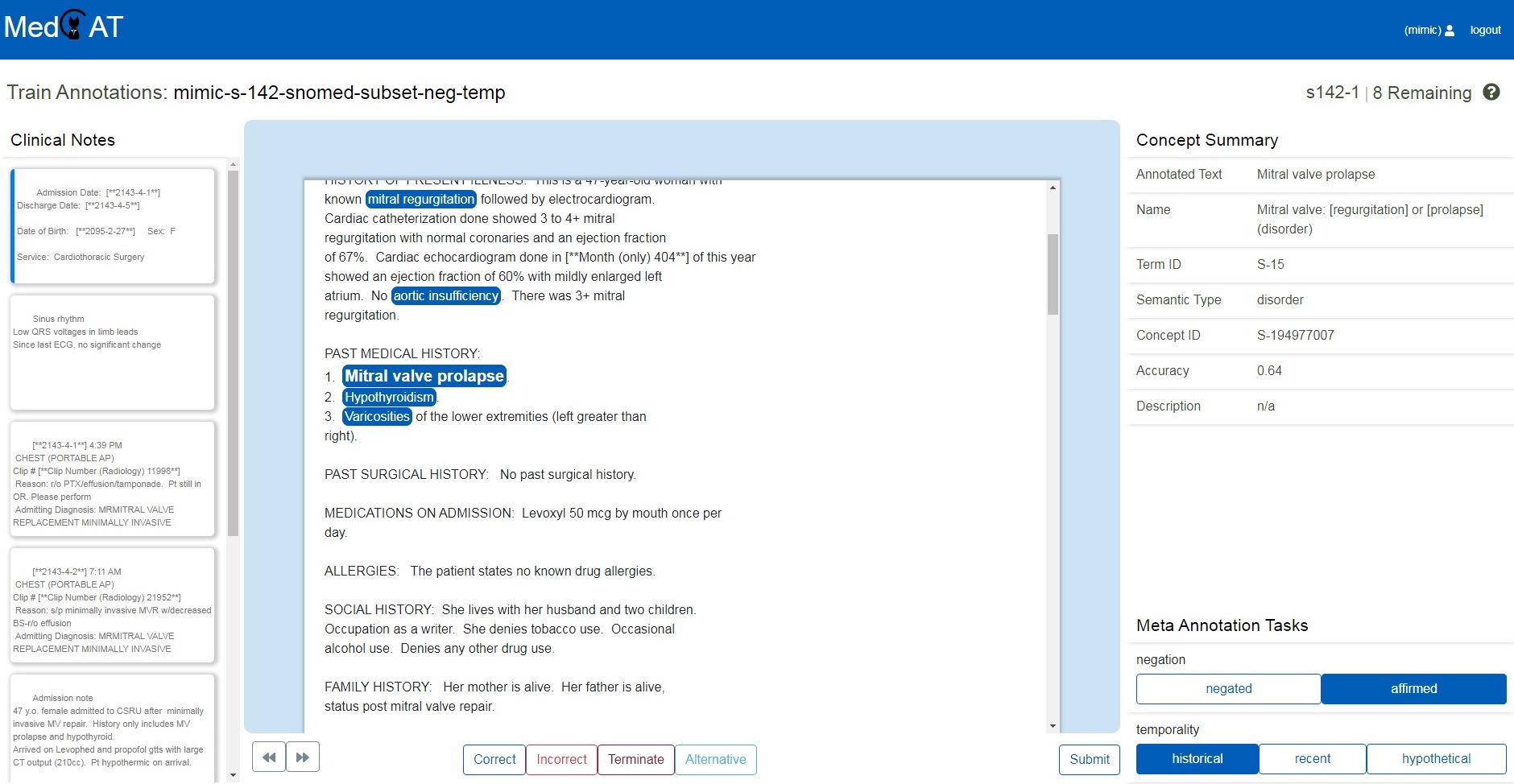
| MedCAT Trainer is an interface for building, improving and customising a given Named Entity Recognition and Linking models for biomedical domain text. The models trained by MedCAT Trainer can be later used directly with custom Python applications using on MedCAT module. Alternatively, the models can be deployed in data pipelines, e.g. behind a RESTful API via MedCAT Service. Key resources:
|
 |
MedCAT Service
MedCAT Service implements a RESTful API over MedCAT module to perform extraction of concepts from provided text. Usually, a single instance of MedCAT Service will be serving a single MedCAT model. Such model can be later deployed in data processing pipelines. The API specification is provided in the sections below.
Key resources:
- GitHub repository with code, documentation and use examples: https://github.com/CogStack/MedCATservice
Tip
Please note that there is available public MedCAT model trained on MedMentions corpus that can be used to play with.
REST API definition
The API defines 3 endpoints, that consume and return data in JSON format:
- GET
/api/info- displays general information about the the NLP application, - POST
/api/process- processes the provided single document and returns back the annotations, - POST
/api/process_bulk- processes the provided list of documents and returns back the annotations.
GET /api/info
Returns information about the used NLP application. The returned fields are:
name,version,languageof the underlying NLP applicationparameters– a generic JSON object representing any relevant parameters that have been specified to the application (optional)
POST /api/process
Returns the annotations extracted from the provided document.
The request message payload JSON consists of following objects
contentthat represents the single document content to be processedapplicationParams– a generic JSON object representing NLP application run-time parameters (optional)
The single document processing content (***) has following keys :
text– the document to be processedmetadata– a generic JSON object representing any relevant metadata associated with the document that will be consumed by the NLP application (optional)footer– a generic JSON object representing a payload footer that will be returned back with the result (optional)
The response message payload JSON consists of an object result that has following fields:
text– the input document that was processed (optional)annotations– an array of generic JSON annotation objects, not enforcing any schemametadata– a metadata associated with the processed document that was reported by the NLP application (optional)success– boolean value indicating whether the NLP processing was successfultimestamp– document processing timestamperrors– an array of NLP processor errors (present only in case whensuccessisfalse)footer– the footer object as provided in the request payload (present only when provided in the request message)
POST /api/process_bulk
Returns the annotations extracted from a list of documents.
The request message payload JSON consists of following objects
content– an array of documents content to be processedapplicationParams– a generic JSON object representing NLP application run-time parameters (optional)
Here, the content object holds an array of single document content to be processed as defined above in (***).
Example use
Tip
Please see CogStack using Apache NiFi Deployment Examples to see how to deploy example NLP services, i.e. MedCAT with a public MedMentions model.
MedCAT
Assuming that the application is running on the localhost with the API exposed on port 5000, one can run:
curl -XPOST http://localhost:5000/api/process \
  -H 'Content-Type: application/json' \
  -d '{"content":{"text":"The patient was diagnosed with leukemia."}}'
and the received result:
{
  "result": {
    "text": "The patient was diagnosed with leukemia.",
    "annotations": [
      {
        "pretty_name": "leukemia",
        "cui": "C0023418",
        "tui": "T191",
        "type": "Neoplastic Process",
        "source_value": "leukemia",
        "acc": "1",
        "start": 31,
        "end": 39,
        "info": {},
        "id": "0",
        "meta_anns": {}
      }
    ],
    "success": true,
    "timestamp": "2019-12-03T16:09:58.196+00:00"
  }
}